Claude Code Cost: What You Actually Pay (and How to Track It)
If you've started using Claude Code seriously, you've probably had the same uneasy moment: you have no idea how much you just spent. There are actually two completely different ways to pay for Claude Code — a flat subscription and per-token API billing — and most people don't know which one they're really on, let alone where the money goes.
This guide breaks down three things: how Claude Code billing actually works, what burns the most tokens, and how to track your real spend instead of guessing.
How Claude Code billing works: subscription vs API
There are two paths, and they behave nothing alike.
Subscription (Pro / Max). You pay a fixed monthly fee and get a usage allowance with rate limits. Claude Code is included in the Pro and Max plans. This is predictable — you pay the same every month — but the trade-off is opacity: you don't see a dollar figure per session, just whether you've hit your limit. Heavy users on Max rarely know how close they run to the ceiling.
API key (pay-as-you-go). You plug in an Anthropic API key and pay per token: input tokens, output tokens, and cache reads/writes, each priced differently per model. This scales exactly with what you do — cheap on light days, alarming on a long refactor — and every token is billable.
| Subscription (Pro/Max) | API key | |
|---|---|---|
| Billing | Flat monthly fee | Per token |
| Cost predictability | High | Low (scales with use) |
| Visibility into spend | Allowance only | Itemized, but raw |
| Best for | Steady daily use | Bursty / heavy automation |
Is Claude Code free? Not really. There's no standalone free tier — you're either inside a paid Claude subscription or paying per token through the API. The closest thing to "free" is routing Claude Code to a cheaper or local model backend, which we cover below.
What actually drives your token cost
Token cost isn't random. A handful of things quietly dominate the bill:
- Context window size. Every turn re-sends the conversation plus the files in context. The bigger your working context, the more input tokens you pay for on every message — not just once.
- Long sessions. A session that runs for hours accumulates context. The 50th message in a session costs far more than the 1st, because it's dragging everything before it along.
- Subagents and tool loops. Spawning subagents or letting the model read large files repeatedly multiplies token usage fast.
- Model choice. Opus, Sonnet, and Haiku are priced very differently. Running Opus for a task Haiku could handle is the single most common way to overspend.
This is also why a single monthly total tells you so little: the real signal is which repo and which model burned the tokens. A bug-hunt in one repo on Opus can cost more than a week of light edits everywhere else.
How to track your Claude Code cost
There are three levels of visibility, from blunt to useful:
1. The official dashboard. Anthropic's console shows your aggregate API spend. It's accurate, but it's a single number — no breakdown by repository, by model, or by session. You know you spent $40 last week; you don't know that $31 of it was one repo on Opus.
2. Parsing the logs yourself. Claude Code writes session logs as .jsonl files locally. Every token count is in there. You can write a script to parse and sum them — but you'll rebuild the same tooling everyone else does, and keep maintaining it.
3. A local cost tracker. This is where Tokipet comes in. Tokipet is a macOS menu-bar desk pet that reads those local session logs automatically and turns them into a real cost dashboard: spend per repo, per model, per day, with a contribution graph and a month-to-date forecast. It parses everything on-device — your code and prompts never leave your machine; only aggregate numbers are used. And because it watches the logs passively, there are no workflow changes: you keep using Claude Code exactly as before.
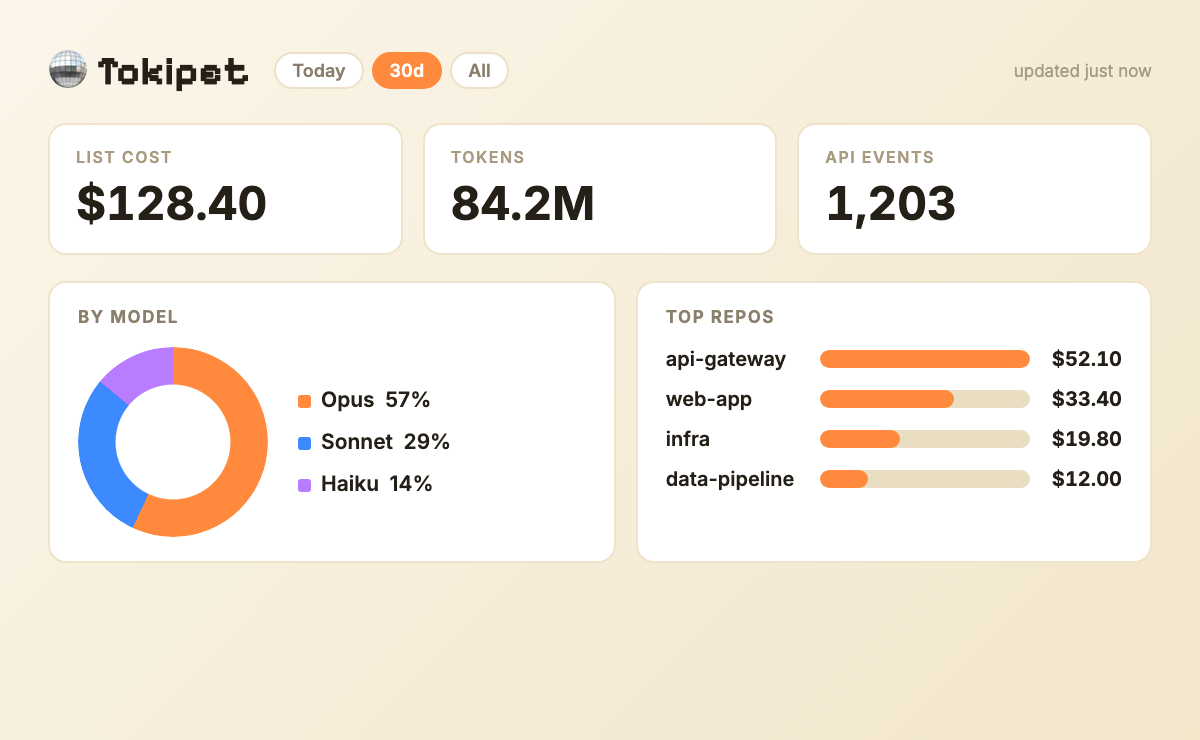
It also works beyond Claude Code — Cursor, Codex, Cline, and other agents log the same way — so if you run more than one tool, you get one combined view of where the money goes.
How to reduce your Claude Code cost
Once you can see the spend, cutting it gets concrete:
- Match the model to the task. Use Haiku or Sonnet for routine edits and reserve Opus for genuinely hard problems. This alone often halves a bill.
- Keep context lean. Start fresh sessions for unrelated work instead of letting one session balloon. Clear files you're done with.
- Route to a cheaper backend. Tools like claude code with OpenRouter or a claude-code-router let you point Claude Code at cheaper or local models for the work that doesn't need a frontier model.
- Watch the long tail. Long-running sessions and repeated large-file reads are silent budget killers — they rarely feel expensive in the moment.
For the specific tools that do each of these — measuring, routing, and trimming context — see the curated roundup of Claude Code skills that cut your token bill. To actually see your numbers, see how to check your Claude Code usage. For a step-by-step how-to, see 9 ways to reduce Claude Code token usage; to choose the cheapest plan, see Pro vs Max vs API.
The thread running through all of these: you can't cut what you can't see. Reducing cost starts with knowing where it's going.
FAQ
How much does Claude Code cost? It depends on your plan. On a subscription, you pay a flat Claude Pro or Max monthly fee. On the API, you pay per token, so it scales with use — a few dollars on light days, into the hundreds for heavy daily automation.
Does Claude Code cost money? Yes. There's no standalone free tier — you're either inside a paid Claude Pro/Max subscription or paying per token through an Anthropic API key.
How much does it cost to use Claude Code per month? On subscription, it's the flat Pro or Max fee. On API billing it varies with your token usage; tracking your spend per repo and model is the only way to know your real monthly number.
Does Claude Code charge per token? On the API plan, yes — input, output, and cache tokens are each billed at per-model rates. On a subscription, you pay a flat fee with usage limits instead.
How do I see my Claude Code usage? Run /cost in a session for the current total, or npx ccusage@latest for history. For a continuous per-repo and per-model breakdown, a local tracker like Tokipet reads your session logs and itemizes it. Full walkthrough: how to check your Claude Code usage.
Stop guessing what Claude Code costs you. Tokipet reads your logs locally and shows your real spend, per repo and per model — install it here.