Track Your Claude Code Cost on Windows (and Linux)
Claude Code runs fine on Windows and Linux. The tools to see what it costs you mostly don't — they're macOS menu-bar apps. So if you're not on a Mac, you're back to running /cost by hand and squinting at the official console's single monthly number.
Here's the short version: you can now track your real Claude Code spend on Windows or Linux in one line, without installing a desktop app.
Why tracking cost off-Mac has been awkward
Claude Code writes a full record of every request — input, output, and cache tokens, per model — to local .jsonl session logs under ~/.claude/projects. Everything you'd need to compute your exact cost is sitting on your disk.
The catch is reading it. A website can't open files on your machine (browsers block that for good reason), and the nicest cost dashboards have shipped as Mac-only apps. So Windows and Linux users got left with the blunt options: the /cost command, or the Anthropic console's aggregate total with no breakdown by repo or model.
The one-line fix: a cross-platform collector
Tokipet is a desktop pet that turns your AI coding bill into a living dashboard. The pet itself is macOS-only — but the part that reads your logs and computes your cost is now a small cross-platform CLI you can run anywhere Node runs:
Sign in, then let it watch your logs:
npx tokipet-collector login— sign in with a one-time email codenpx tokipet-collector run— watch your logs and upload your daily totals
That's it. It needs Node 18+, which you already have if you installed Claude Code. Prefer a permanent command? npm i -g tokipet-collector then tokipet-collector run.
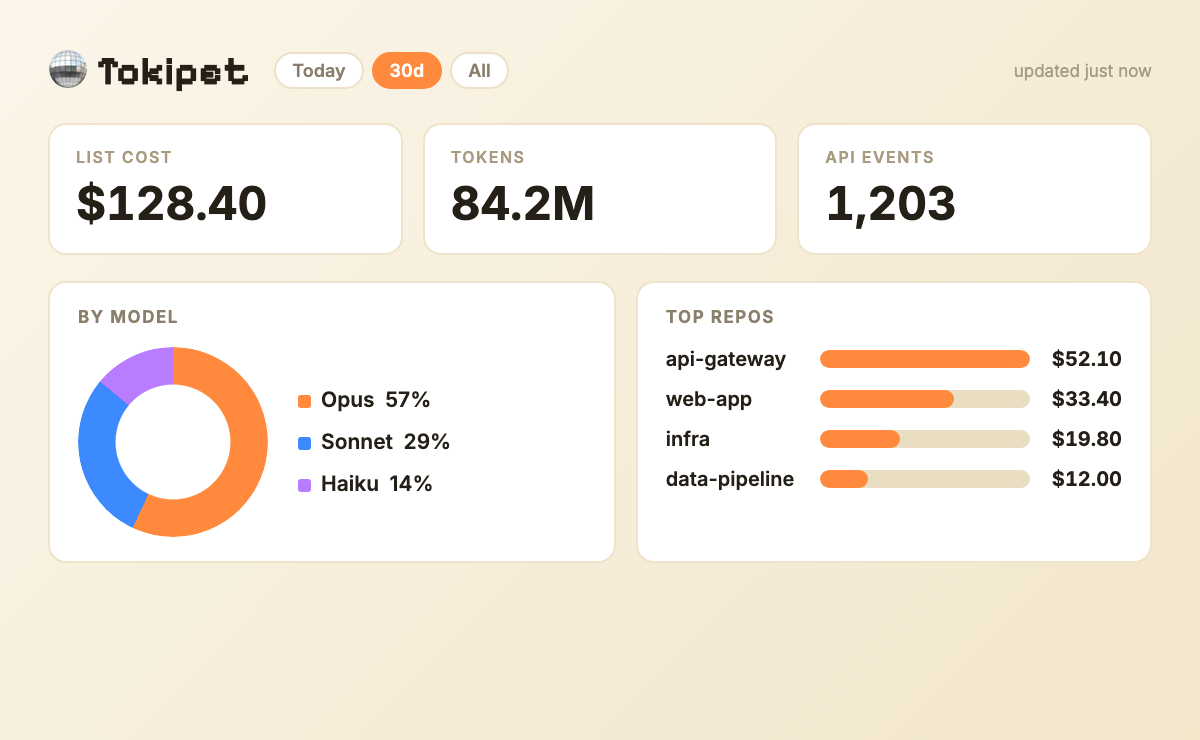
Once it's running, your numbers show up on your Tokipet dashboard on the web — spend per day, a contribution-style calendar, your streak, the leaderboard, and your daily draw — the same data the Mac app shows, just in the browser.
What it reads, and what it sends
This matters, because you're pointing a tool at your dev machine:
- Reads
~/.claude/projects/*/.jsonl— Claude Code's own session logs — incrementally. - Sends only aggregated daily totals:
{ date, tokens, cost }per day. Your prompts, your code, and your file contents never leave your machine. - Stores its session token and read offsets in your OS app-data folder (
%APPDATA%\Tokipeton Windows,~/.config/tokipeton Linux).
The source is on GitHub and the package is on npm, so you can read exactly what it does before you run it. Cost is computed with the same per-model price table the app uses (kept in sync with the community LiteLLM price map), so a given day's number matches across machines.
Windows, WSL, and Linux
- Native Windows — Claude Code keeps its logs under
%USERPROFILE%\.claude, same layout as everywhere else. The collector finds them automatically. - WSL — if you run Claude Code inside WSL, run the collector inside the same WSL distro; it reads the Linux-side
~/.claude. - Linux — works out of the box.
On a Mac?
Then you get the full thing: a pixel pet that lives in your menu bar, reacts as you code, and shows the same cost dashboard locally — download it here. The CLI above is for everyone who isn't on macOS yet.
Cut the cost once you can see it
Visibility is step one; the next is spending less. The mechanics are the same on every platform — see what Claude Code actually costs and where it goes, the step-by-step 9 ways to reduce Claude Code token usage, and how to check your Claude Code usage. Picking a plan? Pro vs Max vs API.
FAQ
Can I track Claude Code cost on Windows? Yes. Run npx tokipet-collector login then npx tokipet-collector run. It reads Claude Code's local session logs on Windows and shows your spend per day on the web — no Mac required.
Does it send my code or prompts anywhere? No. It parses the logs on your machine and uploads only aggregated daily totals (date, token count, cost). Prompts and code never leave your device.
Does it work in WSL? Yes. Run it inside the same WSL distro where you run Claude Code, so it reads that environment's ~/.claude logs.
Is it free? The collector is free and open. You still pay Anthropic for Claude Code itself — that's the cost it's helping you see.
How is this different from npx ccusage? ccusage prints a one-off summary in your terminal. The collector keeps your history in a dashboard with per-day trends, a calendar, and a leaderboard, and it runs continuously in the background instead of on demand.
Track your Claude Code spend on any OS. Run npx tokipet-collector login, or grab the Mac app at tokipet.app.